01
What AI can help with
AI can summarise, draft, classify, compare, plan, brainstorm, reformat and explain. It is strongest when a person gives clear context and reviews the result.
This guide helps organisations move from curiosity to controlled, useful AI practice across admin, customer service, operations, marketing, HR, training and management tasks.
Business owners, managers, operations leads, HR teams, administrators, customer service teams and staff who want AI to improve work without creating uncontrolled risk.
AI can summarise, draft, classify, compare, plan, brainstorm, reformat and explain. It is strongest when a person gives clear context and reviews the result.
Risk appears when teams paste confidential information into tools, rely on unchecked facts, automate sensitive decisions or use inconsistent outputs with customers.
Good AI use is task-based, reviewed by a person, documented where needed and aligned to your organisation's data, brand and quality standards.
These principles make the guide easier to apply in real settings because they connect knowledge to decisions, habits and quality checks.
Choose work that staff already repeat, such as drafting emails, summarising meetings or creating training notes.
Keep client data, contracts, HR details, passwords and commercial information out of tools that are not approved.
Every AI output that affects customers, money, people or compliance needs human review.
Shared prompt templates make quality easier to control across departments.
Track time saved, quality improvements, customer response and staff confidence.
Managers need to understand both opportunity and risk so AI does not spread informally without control.
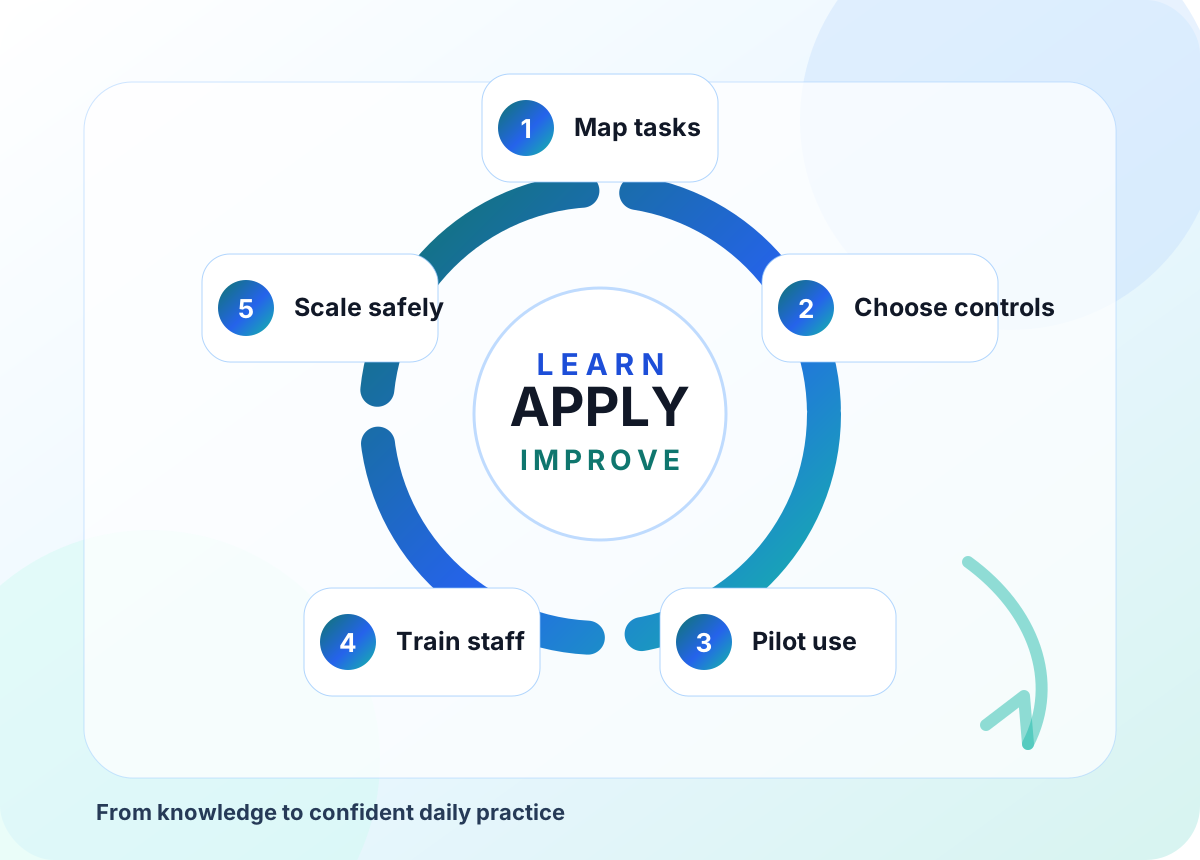
Use this flow as a practical route from first understanding to confident action, review and improvement.
List repetitive tasks and identify where time, quality or consistency could improve.
Agree which tools, data rules and approval routes are allowed.
Test AI with one team and one workflow before wider rollout.
Teach prompting, checking, privacy and brand-safe output review.
Document what works, measure benefit and expand with governance.
These examples are deliberately practical so teams can connect the guide to real conversations, real learners, real customers and real quality expectations.
A service team uses AI to draft polite responses from approved guidance. Staff remove customer identifiers, check the answer and adjust tone before sending.
The important habit is to use the knowledge with review, context and a clear professional decision rather than treating a tool, template or checklist as the final answer.
A manager uses AI to turn notes into actions, owners and deadlines. Sensitive details are removed first, and the final action list is checked against the meeting record.
The important habit is to use the knowledge with review, context and a clear professional decision rather than treating a tool, template or checklist as the final answer.
HR turns a policy into short training scenarios. A manager checks that the examples match company procedure and adds escalation routes.
The important habit is to use the knowledge with review, context and a clear professional decision rather than treating a tool, template or checklist as the final answer.
Choose two or three actions first. Once those become normal practice, add the next layer. Sustainable improvement is better than a rushed rollout.
Good implementation is usually about clear judgement, consistent routines and knowing when to slow down.
Buying tools before agreeing what problem they solve.
Letting every team create its own AI practice with no shared rules.
Using AI for sensitive decisions without clear human accountability.
Measuring excitement instead of measurable improvements.
HHF Training can help businesses introduce AI through staff CPD, workflow mapping, policy support, safe prompting and practical implementation plans.
Speak with HHF Training about AI training, cyber safety, CPD, assessment design, quality assurance or digital transformation support.