
Free Guide

AI guide for teachers and education teams

Start from the basics, understand what AI can and cannot do, then turn that knowledge into safer planning, stronger teaching support and clearer learner guidance.

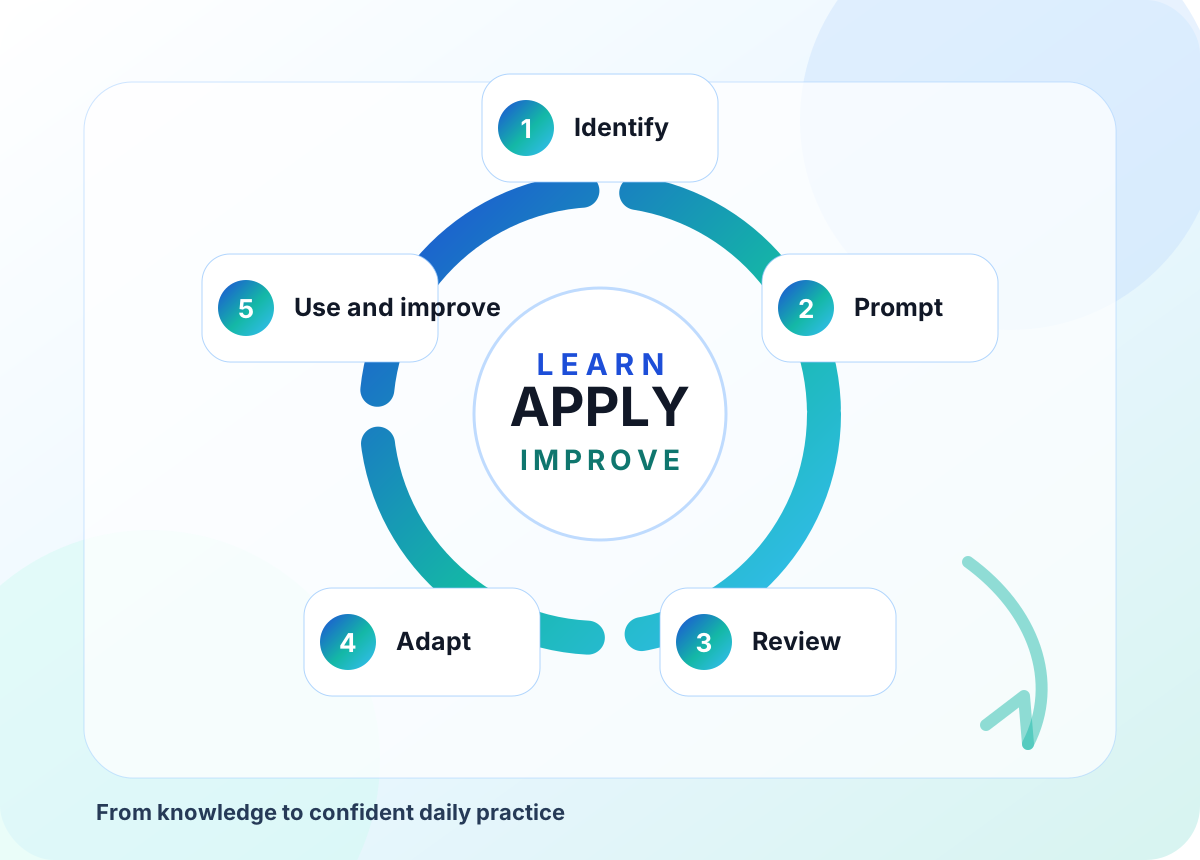
AI guide for teachers and education teams learning cycle visual
Start Here

Who this guide is for and what it will help you do.

Teachers, trainers, curriculum leads, tutors, assessors, learning support teams and managers who want practical AI confidence without losing professional judgement.

01

What AI means in education

AI tools can generate, summarise, classify, compare and suggest content. They do not understand your learners, context, safeguarding duties or awarding body requirements unless you bring that professional judgement.

02

What teachers should use it for

Use AI to draft options, simplify explanations, create practice questions, adapt resources, plan activities, produce feedback prompts and explore ideas. Review everything before learners see it.

03

What teachers should avoid

Avoid entering personal learner data, confidential assessment evidence, safeguarding notes or anything that would breach your organisation's policies. Avoid using AI as the final decision maker.

Core Principles

The simple rules that keep practice useful, safe and professional.

These principles make the guide easier to apply in real settings because they connect knowledge to decisions, habits and quality checks.

AI

Human judgement first

AI should support teaching decisions, not replace the teacher's responsibility for accuracy, fairness and learner needs.

AI

Protect learners

Keep personal data, safeguarding concerns and sensitive support information out of open AI tools.

AI

Be transparent

Learners should know when AI is being used to support activities, feedback or resources.

AI

Check quality

Review outputs for bias, reading level, factual accuracy, accessibility and curriculum alignment.

AI

Teach responsible use

Show learners how to question AI, cite sources and use tools as support rather than shortcuts.

AI

Keep evidence clear

Where AI has helped planning or resource design, keep a simple note of what was generated and what was changed.

Implementation Flow

How to turn the learning into everyday practice.

Use this flow as a practical route from first understanding to confident action, review and improvement.

1

Identify

Choose one real teaching task where AI could save time or improve clarity.

2

Prompt

Ask for a draft with the audience, level, topic, constraints and desired format.

3

Review

Check accuracy, inclusion, safeguarding, assessment fit and tone.

4

Adapt

Rewrite for your learners and add examples from your course or workplace.

5

Use and improve

Try it, gather learner response, then refine your prompt and resource.

Real-Life Examples

What this looks like in normal working life.

These examples are deliberately practical so teams can connect the guide to real conversations, real learners, real customers and real quality expectations.

Scenario Lesson planning

How the knowledge is applied

A tutor teaching employability asks AI to produce three activity ideas for learners with mixed confidence. The tutor chooses one idea, adds local job examples, removes unsuitable wording and creates a short reflection activity.

The important habit is to use the knowledge with review, context and a clear professional decision rather than treating a tool, template or checklist as the final answer.

Scenario Feedback support

How the knowledge is applied

An assessor asks AI to turn a long feedback note into clearer developmental language. They remove any learner names, check it against criteria and add precise next steps linked to the qualification.

The important habit is to use the knowledge with review, context and a clear professional decision rather than treating a tool, template or checklist as the final answer.

Scenario Differentiation

How the knowledge is applied

A teacher asks for the same explanation at three reading levels. They select the most useful version, add visuals, and check that technical vocabulary remains correct.

The important habit is to use the knowledge with review, context and a clear professional decision rather than treating a tool, template or checklist as the final answer.

Action Checklist

Use this checklist to move from reading to action.

Choose two or three actions first. Once those become normal practice, add the next layer. Sustainable improvement is better than a rushed rollout.

Set a policy boundaryKnow what data staff can and cannot enter into AI tools.
Use prompt templatesGive staff safe reusable prompts for lesson planning, feedback and resource adaptation.
Check before publishingCreate a quick quality check for accuracy, bias, accessibility and curriculum fit.
Support learnersTeach acceptable AI use, plagiarism risks and how to verify information.
Keep audit notesRecord where AI helped create resources or assessment support.
Review impactAsk whether AI saved time, improved clarity or created new risks.
Avoid These Mistakes

Common traps that reduce trust, quality or impact.

Good implementation is usually about clear judgement, consistent routines and knowing when to slow down.

!

Mistake 1

Using AI output without checking the curriculum, local policy or learner needs.

!

Mistake 2

Entering learner names, assessment evidence or sensitive information into public tools.

!

Mistake 3

Letting learners think AI output is automatically reliable.

!

Mistake 4

Focusing only on tool demonstrations instead of everyday teaching tasks.

Want this guide turned into practical staff training?

HHF Training can deliver practical AI CPD for education teams, including safe prompting, classroom use, learner guidance, assessment integrity and staff confidence.

Speak to HHF Training