
01
What cyber safety means
Cyber safety means protecting people, accounts, devices, information and services from avoidable digital harm.
Cyber safety is not only an IT issue. It is a daily behaviour issue. This guide starts with the basics and turns them into habits your team can actually follow.
Staff teams, managers, tutors, administrators, volunteers, community workers and learners who use email, shared files, online accounts and digital communication.
Cyber safety means protecting people, accounts, devices, information and services from avoidable digital harm.
Weak passwords, phishing emails, unsafe links, accidental sharing, lost devices, outdated software and unclear reporting routes create many incidents.
Most organisations need simple routines more than complicated language. Staff need to know what to do before, during and after a risk appears.
These principles make the guide easier to apply in real settings because they connect knowledge to decisions, habits and quality checks.
Unexpected links, attachments and payment requests should be checked before action.
Use long unique passwords and multi-factor authentication wherever possible.
Check recipients, file permissions and sensitivity before sending or uploading information.
People should feel confident reporting mistakes quickly without fear.
Updates reduce known weaknesses and should not be ignored for weeks.
Short realistic exercises help staff recognise risks under pressure.
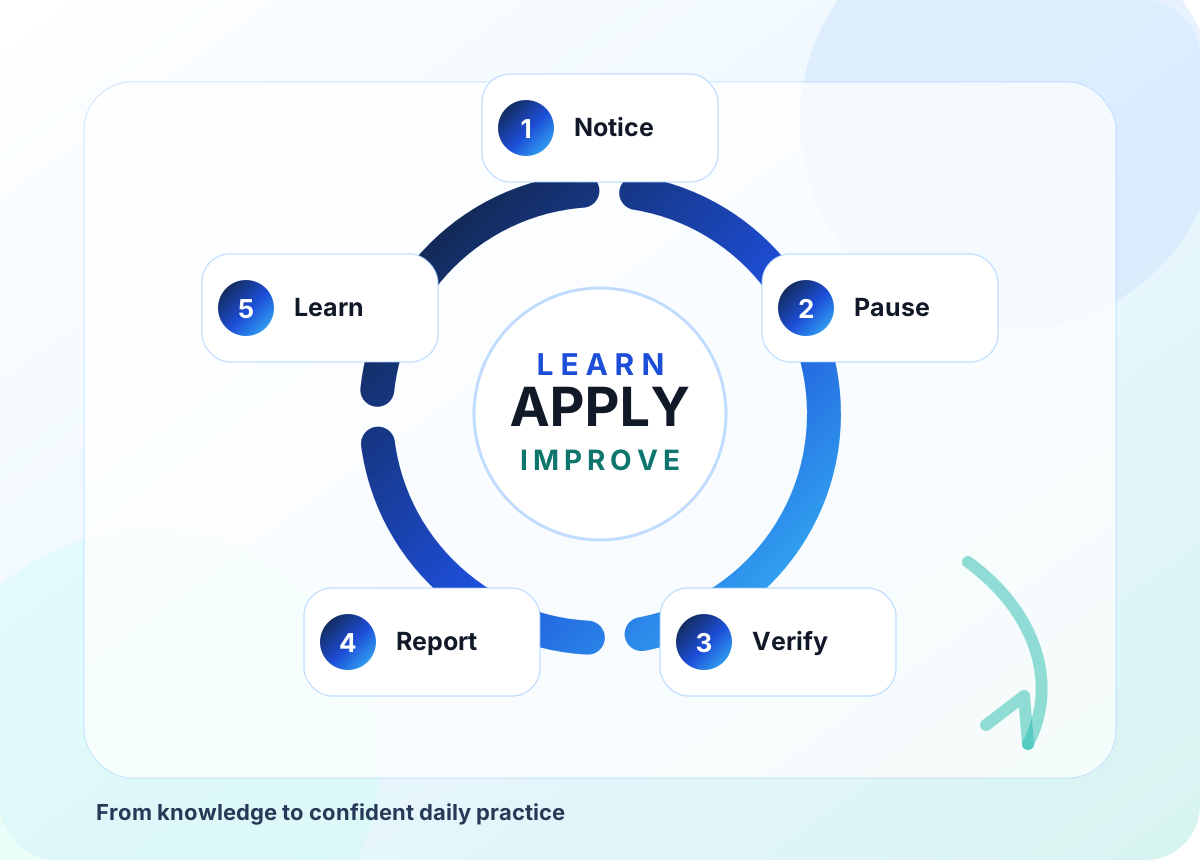
Use this flow as a practical route from first understanding to confident action, review and improvement.
Spot something unusual, urgent, unexpected or too good to be true.
Do not click, reply, download, pay or forward until checked.
Use a trusted route such as a known phone number or internal contact.
Tell the right person quickly, even if you already clicked.
Update guidance and share the lesson without blaming individuals.
These examples are deliberately practical so teams can connect the guide to real conversations, real learners, real customers and real quality expectations.
A finance assistant receives a bank detail change request. Instead of replying, they call the supplier using the existing phone number and discover the email was fake.
The important habit is to use the knowledge with review, context and a clear professional decision rather than treating a tool, template or checklist as the final answer.
A tutor realises a folder link allows anyone to view learner files. They restrict permissions, notify the manager and review sharing settings with the team.
The important habit is to use the knowledge with review, context and a clear professional decision rather than treating a tool, template or checklist as the final answer.
A staff member uses the same password across services. The organisation introduces password manager guidance and multi-factor authentication on key accounts.
The important habit is to use the knowledge with review, context and a clear professional decision rather than treating a tool, template or checklist as the final answer.
Choose two or three actions first. Once those become normal practice, add the next layer. Sustainable improvement is better than a rushed rollout.
Good implementation is usually about clear judgement, consistent routines and knowing when to slow down.
Treating cyber safety as one annual training session.
Blaming people for reporting mistakes instead of learning from them.
Ignoring small warning signs because everyone is busy.
Using technical language that staff cannot connect to real work.
HHF Training can deliver cyber safety workshops for staff, learners and communities using practical examples, simple language and realistic scenarios.
Speak with HHF Training about AI training, cyber safety, CPD, assessment design, quality assurance or digital transformation support.